ShowCall is the professional desktop controller for Resolume Arena — built for worship teams, VJs, and live productions who need theatrical cue control, lightning-fast OSC triggering, and real-time monitoring in one focused app.
macOS · Windows · Linux · MIT License · No account required · Auto-updates included
Who it's for
Whether it's a Sunday service, a festival stage, or a theatre production — ShowCall speaks your workflow.
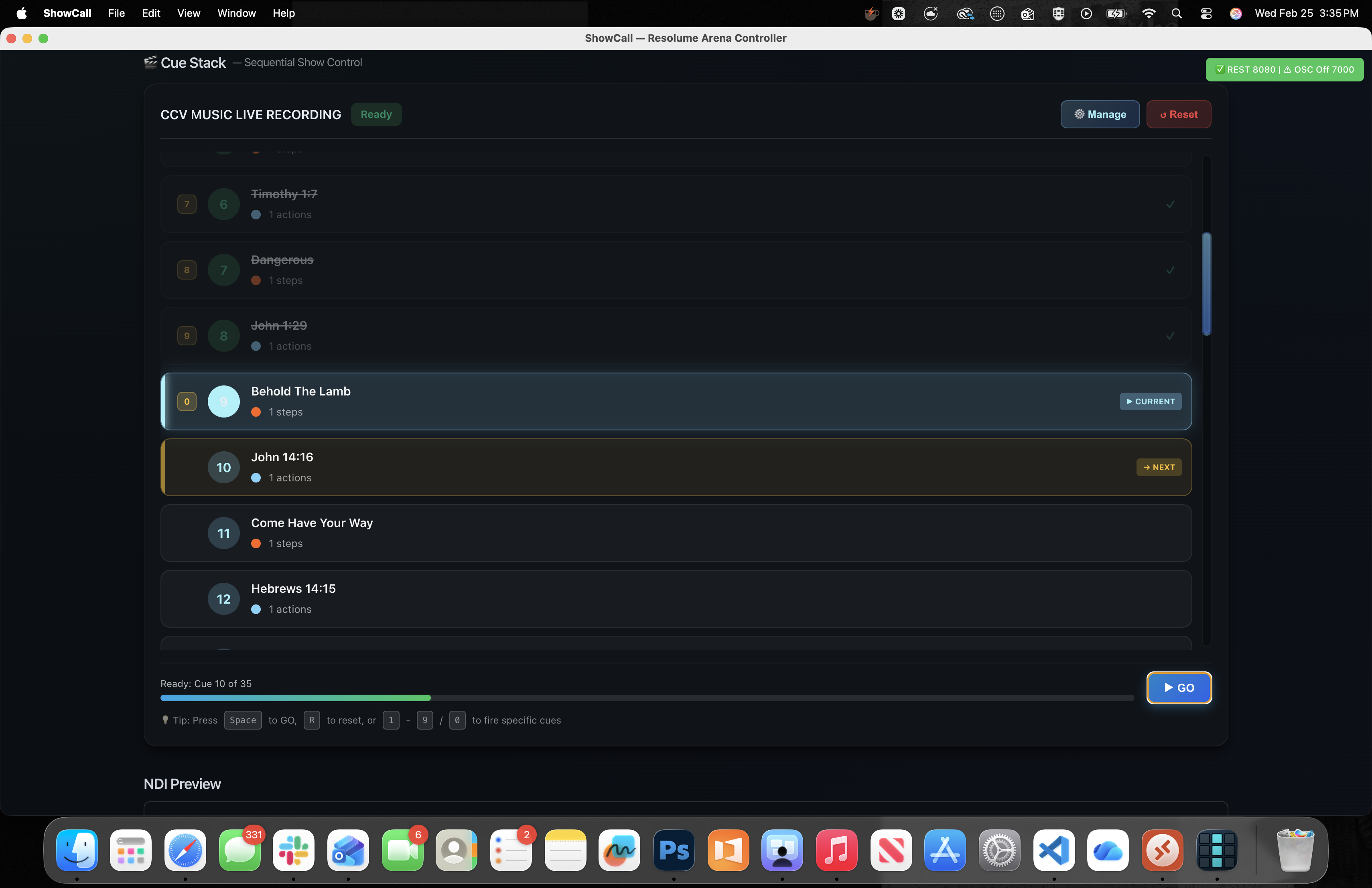
Build your entire service as a named cue list — opening, worship set, scripture slides, message lower thirds, announcements — and step through it with one spacebar press. No fumbling through a clip grid in the dark while the pastor is speaking. Every cue is labeled, ordered, and exactly one press away.
Trigger clips with under 1ms OSC latency — Resolume's official UDP protocol. Monitor BPM in real time. Build multi-step preset macros that clear, wait, and trigger multiple layers in a single button press. The auto-discovery grid reads your entire composition automatically so setup is instant.
ShowCall uses theatrical-style cue numbering — Cue 0 for Standby, then 1, 2, 3 — exactly like professional lighting consoles. Keyboard shortcuts let operators fire cues without touching a mouse. Drag-and-drop lets you reorder when the director changes the running order twenty minutes before curtain.
The Cue Stack is a full theatrical-style run-of-show baked right into ShowCall. Name every cue — song titles, scripture passages, "Post-Message Bumper", whatever your team calls it — then step through the entire service from start to finish without ever hunting for a clip.
Core Features
ShowCall is purpose-built for controlling Resolume Arena. Every feature earns its place.
ShowCall sends clip triggers via UDP using Resolume's official OSC protocol. Fire-and-forget packets mean there's no handshake overhead — your click hits the screen before your brain finishes the thought. Trigger individual clips, full columns, layer toggles, and transport controls all via OSC. This is the right way to control Resolume, not a workaround.
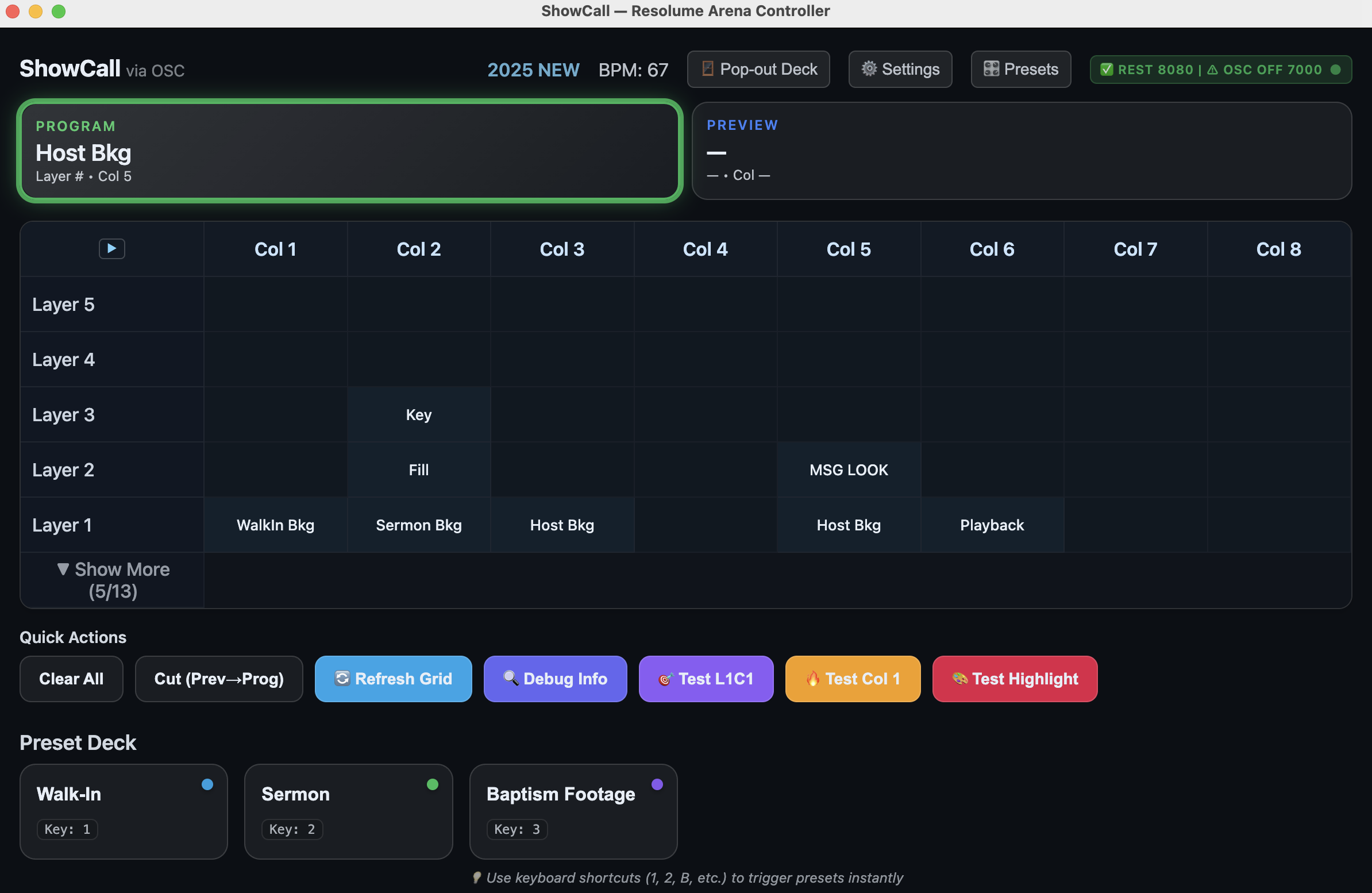
ShowCall polls Resolume's REST API and shows you the current program clip, preview clip, live BPM, and full composition status — updated continuously via Server-Sent Events. Know what's on screen at all times.
Build multi-step macros with a visual editor — clear layers, sleep 200ms, trigger clip on layer 1, trigger clip on layer 2, cut to program. Assign colors, labels, and hotkeys. One button, an entire look, every time.
Open a composition in Resolume and ShowCall reads the entire structure — all layers, all columns, all clip names — automatically. The grid populates itself. Horizontal scrolling handles compositions with 20+ columns, with fixed layer labels always visible on the left.
Every action has a keyboard shortcut. Spacebar, number keys, letter hotkeys — operators who know the shortcuts never need to touch a mouse once the show starts. Your hands stay where they belong.
One-click Cut, Clear All, and transport controls live permanently on screen. When something goes wrong mid-show, you need to clear the screen in one press without navigating menus. ShowCall keeps that button visible at all times.
Detach the preset button panel into its own floating window. Place it on a second monitor, drag it to a tablet sidecar, or arrange it however your multi-screen setup demands. The main interface and deck stay in perfect sync.
ShowCall checks for new releases and can update itself in the background with a progress indicator. macOS builds are fully code-signed and notarized by Apple — no security warnings, ever, on any supported OS.
ShowCall exposes a real-time WebSocket API. Connect custom hardware panels, external scripts, Bitfocus Companion modules, or anything else that speaks WebSocket. The same API that powers Stream Deck sync is open for your own integrations and automation workflows.
Under the Hood
Most Resolume controllers pick one protocol and accept the tradeoffs. ShowCall uses both so you never compromise.
UDP packets are fire-and-forget — no connection overhead, no acknowledgment, no latency penalty. When you trigger a clip, ShowCall sends a raw OSC message over UDP and Resolume responds immediately. This is the protocol Resolume was designed to receive, and the results show it.
Reliable HTTP requests fetch the full composition structure on startup. Server-Sent Events then stream real-time updates — current clip, BPM, composition state — without continuous polling. You always know what's on screen, confirmed by a proper handshake.
Create a preset in ShowCall and it appears on your Stream Deck automatically — no manual button configuration in Companion, no copy-pasting labels. ShowCall syncs over WebSocket in under 100ms. Your hardware always matches your software.
Stream Deck — auto-populated from ShowCall presets
Presets are multi-step macros — build sequences that clear the stage, pause for a transition, trigger specific clips across multiple layers, then cut to program. Assign a hotkey and a color. Run the entire sequence in one press, every single time, exactly the same way.
{ "id" : "worship_intro" , "label" : "Worship Intro" , "color" : "#f59e0b" , "hotkey" : "w" , "macro" : [ { "type" : "clear" }, // Wait for transition to settle { "type" : "sleep" , "ms" : 200 }, { "type" : "trigger" , "layer" : 1 , "column" : 3 }, { "type" : "trigger" , "layer" : 2 , "column" : 3 }, { "type" : "cut" } ] }
"OSC for speed. REST for reliability. Stream Deck for hardware. Cue Stack for shows. ShowCall brings it all together so your tech team can focus on the moment, not the software."ShowCall v2.4.2 · Released February 25, 2026 · MIT License · Free Forever
Quick Start
No cloud account. No subscription. No API key. Just download and point it at Resolume.
Grab the latest installer from GitHub Releases. macOS gets a signed, notarized .dmg — drag to Applications, open immediately with no security warnings. Windows gets a standard .exe installer. Linux gets an AppImage.
In Resolume Preferences, enable OSC Input on port 7000 and enable the Web Server on port 8080. Note your machine's local IP address — that's all ShowCall needs to connect.
Click the ⚙ Settings button in ShowCall, enter the Resolume machine's IP and ports, then save. ShowCall connects, reads your composition, and populates the clip grid automatically.
Create presets, build your cue list with named cues, and assign keyboard shortcuts. On show day, open Cue Stack, press Space to advance, and let ShowCall handle Resolume while you focus on the moment.
ShowCall is free to download, free to use, and open source under the MIT license. No subscription, no feature gating, no sign-up. Just professional Resolume control, yours to keep.
macOS · Windows · Linux · Requires Resolume Arena 7.19+ · MIT License